How to Extract Text from Image Online (Complete OCR Guide 2026)
Copying text from images is no longer a difficult task. Today, you can easily Copy Text from Image using modern Optical Character Recognition tools. These tools help you convert photos, screenshots, and scanned files into editable text within seconds.

In the USA and Countires , students, office workers, and researchers use OCR technology daily to save time and reduce manual typing. Whether you are working with notes, documents, or receipts, an image to text converter makes the process fast, simple, and accurate. With advanced AI support, you can now extract clean text and improve your digital workflow without any technical skills.
Table of Contents
What Is OCR and How Does It Work?
OCR stands for Optical Character Recognition. It is a smart system that helps you Copy Text from Image by turning pictures into real, editable text. In simple terms, it reads letters inside images and converts them into usable digital content using OCR technology and modern AI-powered systems.
Today, when you use an OCR tool or Online OCR, it performs deep analysis of shapes and patterns. It works like a digital brain that understands characters. This process is known as text recognition, and it is the foundation of every image to text converter and OCR software used in 2026.
=> OCR vs Image to Text Technology
OCR mainly focuses on recognizing characters from images. However, image-to-text systems go a step further by understanding structure and layout. For example, OCR can extract words, but AI-based tools can also rebuild tables and formatting. This makes modern Convert image to text tools far more powerful than older systems.
=> Benefits of OCR for Everyday Use
OCR helps students, office workers, and businesses save valuable time. It supports document digitization, improves editable text creation, and enables fast text extraction from images. You can easily convert scanned documents, screenshots, and receipts into digital formats without manual typing.
Why Text Cannot Be Copied Directly from Images
Images store visual data, not actual text. That is why you cannot simply select or copy words from them. Your device only sees pixels, not characters, which makes Copy Text from Image impossible without OCR support.
This is exactly why OCR scanner and OCR software exist. They convert visual patterns into readable characters. Without image text extraction, all information stays locked inside the image format.
When You Need to Extract Text from Images
You need OCR whenever you deal with non-editable content in daily life. Many users in the USA rely on Image to text converter tools for education, office work, and personal use. It plays an important role in modern document workflow systems.
OCR helps convert visual information into structured data, improving speed and reducing manual effort across industries.
=> Documents and PDFs
Scanned files are usually locked formats. OCR helps convert them into a Searchable PDF and editable documents.
=> Screenshots
You often need to Copy text from screenshot when saving online content, app details, or web information.
=> Handwritten Notes
Modern ICR (Intelligent Character Recognition) improves handwritten text reading, although accuracy depends on clarity and writing style
=> Scanned Images
Old papers and printed documents can easily be converted into digital files using OCR tools.
How to Copy Text from an Image Online (Step-by-Step Guide)
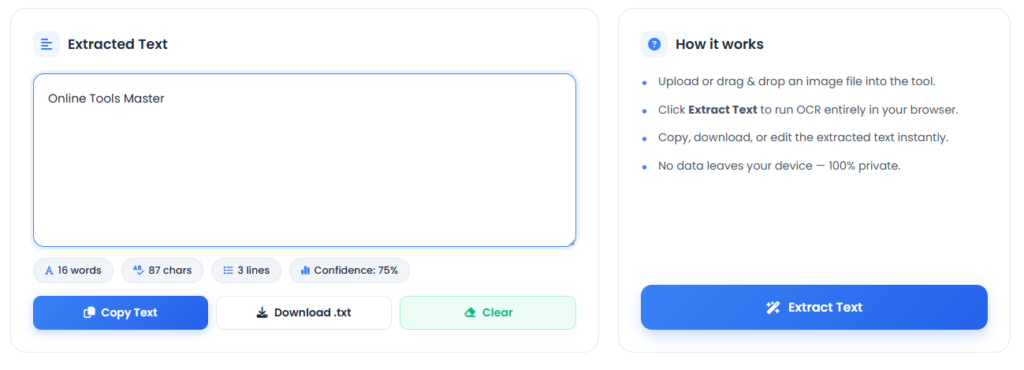
The process to Copy Text from Image is simple when using a reliable Text conversion tool. First, you upload your image. Then the system processes it using AI and returns editable text.
Modern tools support Batch conversion, File conversion, and multiple formats like TXT, DOCX, and PDF. This makes document digitization fast and efficient.
A typical flow looks like this:
Step 1:

Step 2:
| Step | Action | Result |
|---|---|---|
| 1 | Upload image | Image loaded into OCR system |
| 2 | AI processing | Character segmentation and feature extraction |
| 3 | Conversion | Output in Unicode text or ASCII format |
| 4 | Download | Editable file ready |
This workflow improves accuracy and saves significant time.
Best Tools to Copy Text from Images
Many tools help you Extract text from image with high accuracy. These tools vary based on speed, features, and platform support.
A strong Online OCR platform or AI OCR system can even handle complex layouts like invoices and tables more effectively.
=> Online OCR Tools
Web-based tools allow instant conversion without installation. They are fast and simple for Text Extraction From Images.
=> Google Lens
Google Lens is widely used for Mobile OCR. It allows quick scanning and instant extraction of text.
=> Mobile OCR Apps
Apps like Microsoft Lens and Adobe Scan provide powerful Mobile text extraction for Android and iPhone users.
=> AI-Powered Image-to-Text Tools
Modern AI OCR tools use deep learning models. They improve recognition accuracy and handle complex documents better than older systems.
How to Copy Text from Images on Android, iPhone, and Desktop
Modern devices now come with built-in OCR features. This makes OCR technology easily accessible without extra software.
Users can perform Scan image to text directly from mobile or desktop systems.
=> Android Devices
Apple devices use Live Text, which allows instant selection and copying of text from images.
=> iPhone/iPad
Android users use Google Lens and built-in Android OCR tools for fast extraction. It supports real-time Mobile text extraction.
=> Windows and Mac
Desktop users rely on OneNote, Adobe Acrobat, or browser-based OCR tools for OCR scanner functionality.
Tips to Improve OCR Accuracy
OCR results strongly depend on Image quality. Better input always produces better output when you Copy Text from Image.
High resolution and proper lighting significantly improve results, while poor quality reduces accuracy.
=> Use High-Quality Images
Always aim for at least 300 DPI resolution to improve text recognition.
=> Improve Lighting and Contrast
Strong contrast and lighting help OCR systems detect characters more accurately.
=> Avoid Blurry Text
Blurry images affect character recognition and often cause missing words or errors.
Security and Privacy When Splitting PDFs
Security is very important when handling digital portfolio, contracts, or bank statements. Trusted tools use SSL Encryption and Secure File Transfer to protect data.
Many platforms also offer automatic deletion of files after processing. This protects document accessibility and prevents misuse of sensitive information.
Always avoid unknown tools when dealing with identity verification documents or professional documents.
How to Extract Text from Handwritten and Low-Quality Images
Handwritten text is more difficult to process, but ICR (Intelligent Character Recognition) improves results. However, accuracy still depends on writing style and clarity.
Low-quality images often need preprocessing such as cropping or adjusting brightness before using an OCR tool.
Modern systems use AI-powered OCR to better understand complex inputs like whiteboard photos and handwritten notes.
Privacy and Security When Using OCR Tools
Security matters when uploading sensitive files like invoices, receipts, and personal records. Many users rely on OCR for document digitization, so data protection is essential.
Trusted OCR tools use encryption and auto-delete systems to secure user files during processing.
| Security Feature | Benefit |
|---|---|
| Encryption | Protects uploaded files |
| Auto-delete | Removes files after processing |
| No storage | Prevents misuse of data |
Common OCR Problems and How to Fix Them
OCR is powerful but not perfect. Errors can occur during text processing, especially with low-quality images or unusual fonts.
=> Incorrect Characters
This usually happens due to low resolution. Improving image quality fixes most issues.
=> Missing Text
Shadows or cropping often cause missing content during image text extraction.
=> Formatting Issues
Tables and columns may break, especially in Searchable PDF outputs.
Future of OCR and AI Image-to-Text Technology
OCR is evolving into smarter systems powered by deep learning. Future tools will improve recognition accuracy and understand full document context.
Advanced AI-powered OCR and improved Tesseract models will support automation, translation, and structured data processing for businesses.
FAQs
What is the easiest way to extract text without installing software?
The easiest method is to use an online OCR tool. Simply upload your image and download the extracted text in seconds.
Can I use built-in tools on my computer or phone?
Yes. Features like Google Lens on Android and Live Text on iPhone allow you to extract text directly from images.
How accurate is text extraction?
Accuracy depends on image quality, lighting, and text clarity. High-resolution images usually produce excellent results.
Can I extract handwritten text?
Yes. Modern OCR systems with Intelligent Character Recognition (ICR) can recognize many types of handwriting, though results vary.
What file formats are supported by OCR tools?
Most OCR tools support JPG, PNG, WEBP, TIFF, BMP, and HEIC images, along with scanned PDF files.
Final Thoughts
Learning how to Copy Text from Image is an essential digital skill today. It saves time, reduces errors, and improves productivity for students and professionals.
With modern OCR tools, you can easily convert images, PDFs, and screenshots into editable formats. Whether you use Mobile OCR, desktop software, or Online OCR, the process is now faster, smarter, and more accurate than ever before.